
Drupal is a flexible open-source platform used to build everything from small sites to large enterprise websites. There are a few ways to add code to the head of a Drupal site, which is all Converly needs to track your forms. To install Converly on Drupal, follow the instructions below:
Step 1: Copy your install code
The first step is to grab your Converly install code. In Converly, click Install in the left sidebar and copy the code shown at the top. It is unique to your site, so make sure you copy the exact code shown there rather than reusing code from anywhere else. See Install Converly for the full walkthrough.
Step 2: Add the code to your site
The next step is to add that code to your Drupal site. There are a few ways to do this, so simply pick whichever suits you. You only need to follow one.
Method 1: Your theme's template
If you are comfortable editing your theme, you can add the Converly code directly to the <head> of your theme's html.html.twig template so it loads on every page. If you are not sure how to do this, your developer can add it for you in a couple of minutes.
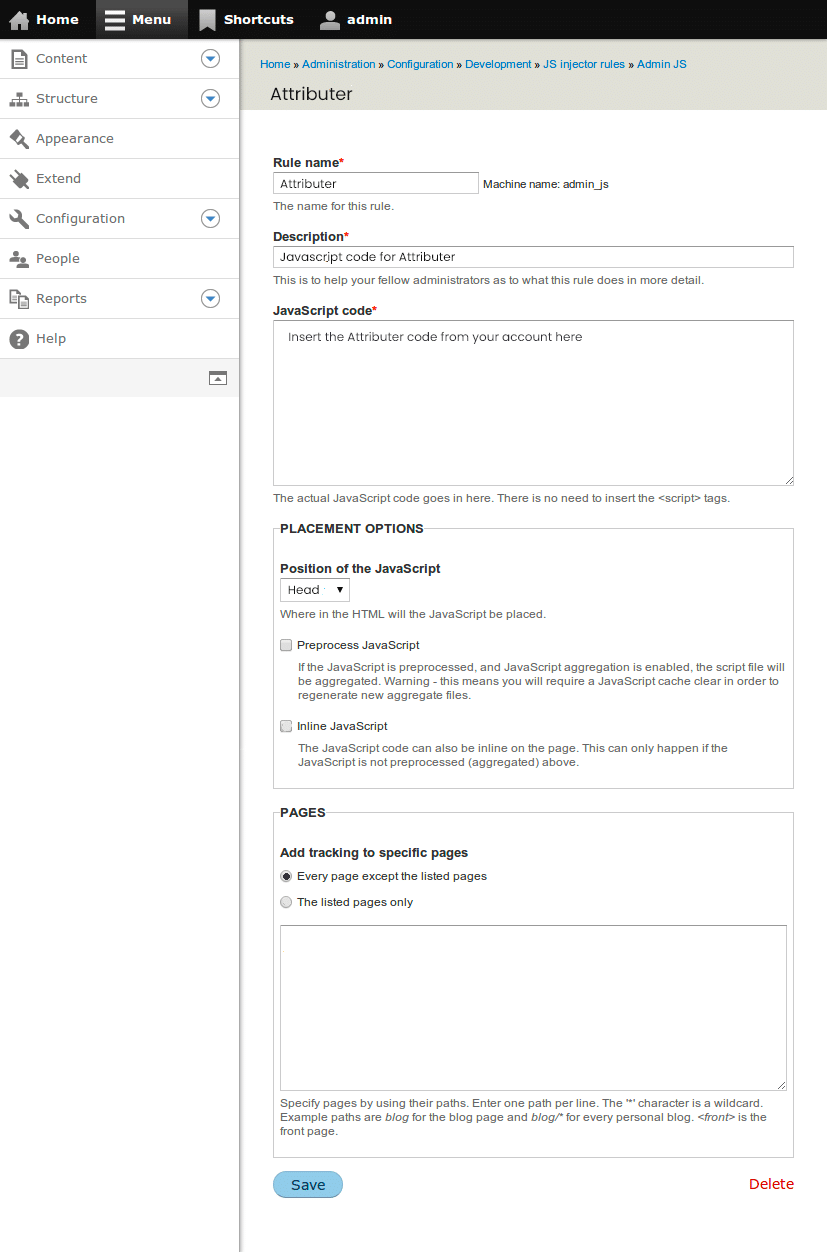
Method 2: The JS Injector module
If you would rather not edit theme files, the simplest option is a free module. Install and enable the JS Injector module (the similar Asset Injector module works the same way). Add a new code snippet containing your Converly code, set it to load site-wide in the page head, then save and clear the Drupal cache.
Method 3: Google Tag Manager
If you already manage tracking through Google Tag Manager, you can add Converly there instead and skip editing Drupal directly. Follow the Google Tag Manager guide for the exact steps.
Test it works
That's it! Converly is now installed on your Drupal site. To check it is working, open a new incognito window, go to your website, and submit a test entry through one of your forms. Then open the Activity page in Converly. If the code is installed correctly, the test conversion shows up there within a moment.
Paste your own code
Any code shown in a screenshot is only an example. Always paste the exact code from your own Install page, which contains the key that is unique to your site. Code copied from anywhere else will not track to your account.