
Before Converly can track anything, its code needs to be on your website. It is a single small script tag that goes in the <head> of every page. You only add it once, and it works for every conversion flow you build.
Step 1: Copy your install code
Click Install in the left sidebar. Your install code is shown at the top. It is unique to your site, so copy the exact code shown there. Click the code box to copy it.
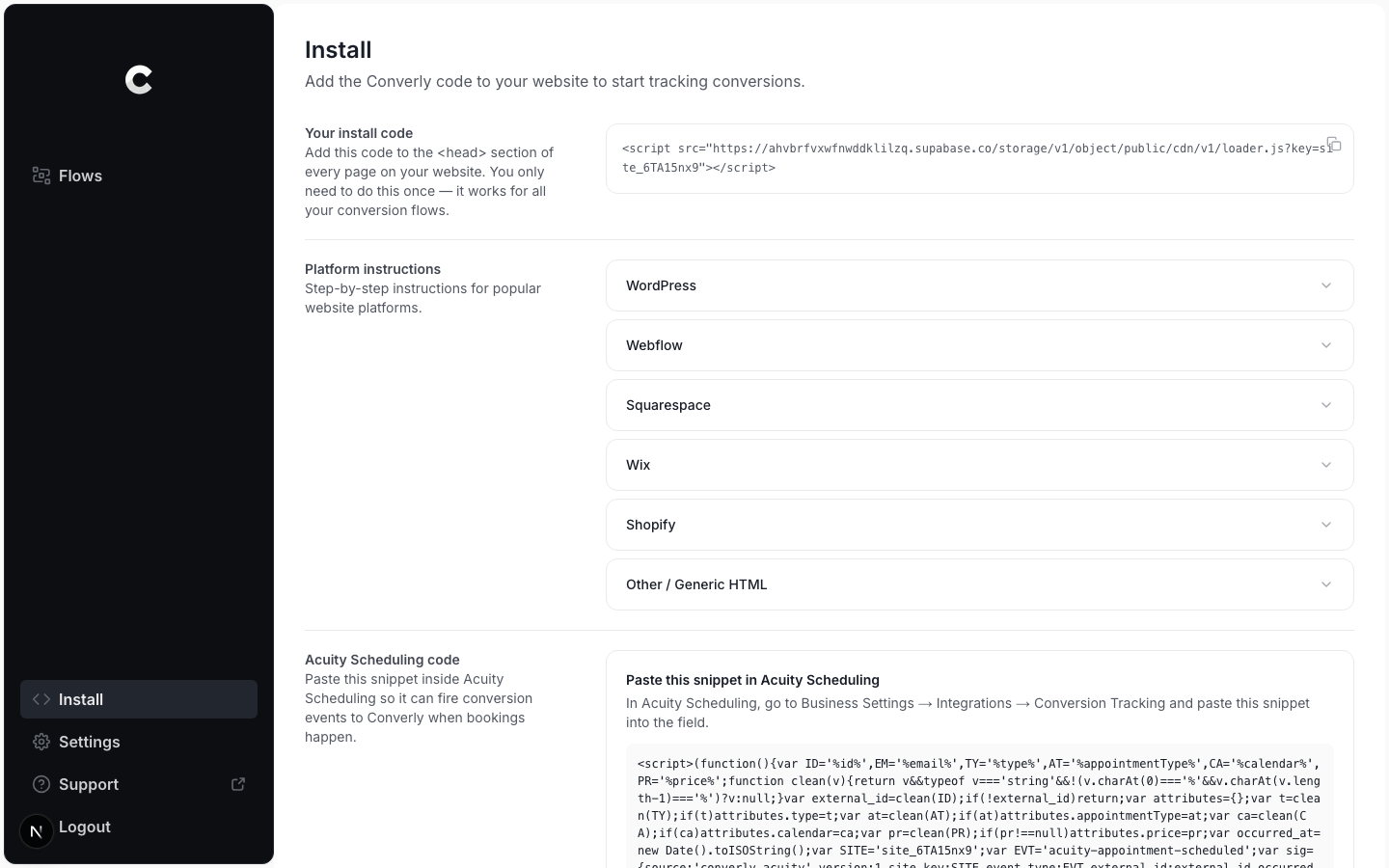
Step 2: Add it to the head of every page
Paste the code into the <head> section of your website, on every page. Most website builders have one place to add head code that applies to the whole site, so you usually only paste it once.
The Install page also has a Platform instructions section with the exact menu path for popular tools.
Pick your platform
These guides walk through where to paste the code on specific platforms:
- WordPress
- Google Tag Manager
- Webflow
- Squarespace
- Wix
- Shopify
- Unbounce
- Drupal
- Duda
- Leadpages
- Ghost
- Instapage
- ClickFunnels
If your platform is not listed, use the generic instructions on the Install page: paste the code in the <head> of every page.
Use your own code
Always copy the code from your own Install page. It contains a key that is unique to your site. Code copied from anywhere else will not track to your account.